2D hex map in Phaser with arrow key navigation
I started playing with hex maps for a web-based game I’ve been developing in my spare time called STAR DEWAR. It’s a space RPG but more than anything else it is a tribute to an old BBS game called Tradewars 2002.
In the original game you travel through the universe in a text based interface where sectors are identified by numerical values. In this version, it is imagined as a 2D hexagonal grid that is procedurally generated, where each hex tile is “sector”.
This is developed using Phaser 4 with help from AI (I started this before AI developed enough to be useful). When I started, I was unable to find good examples of a 2D hex map and how arrow-key navigation might work with it.
Here is a stripped down example of the map, including the “fog of war” and how you navigate it with only arrow keys.
For keyboard navigation, the rules I came up with are is was most natural to me. What I ruled out was having six direction keys and instead wanted an approach that limited it to four.
Each key is restricted to a subset of the six hex directions:
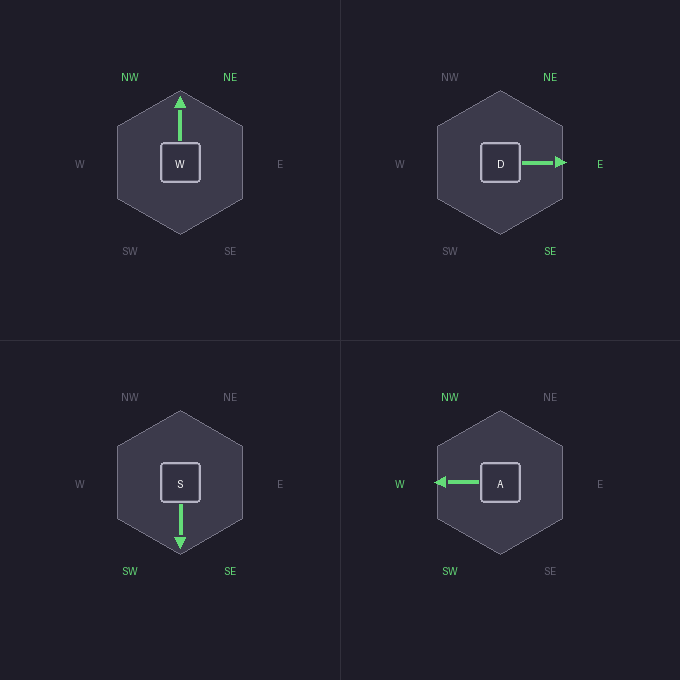
Allowed directions: As shown above, we restrict arrow keys to these directions:↑ NE/NW→ NE/E/SE↓ SE/SW← NW/W/SW.
You can double press (↑→, ↑←, ↓→, ↓←) which will map exactly to NE, NW, SE, SW.
Rules:
- Reverse takes precedence: If the key press is in the opposite direction, always reverse.
- Intended direction: If the intended hex is open, move there.
- Closest open fallback: In many cases there will be multiple open options to pick from in the allowed direction list for the key press. Look at all open allowed hexes and pick the one with the smallest turning angle from current movement direction. If there is a unique winner, move there.
Try it below!
The map is generated with a simple random walk so no two playthroughs look the same. The source is on GitHub.